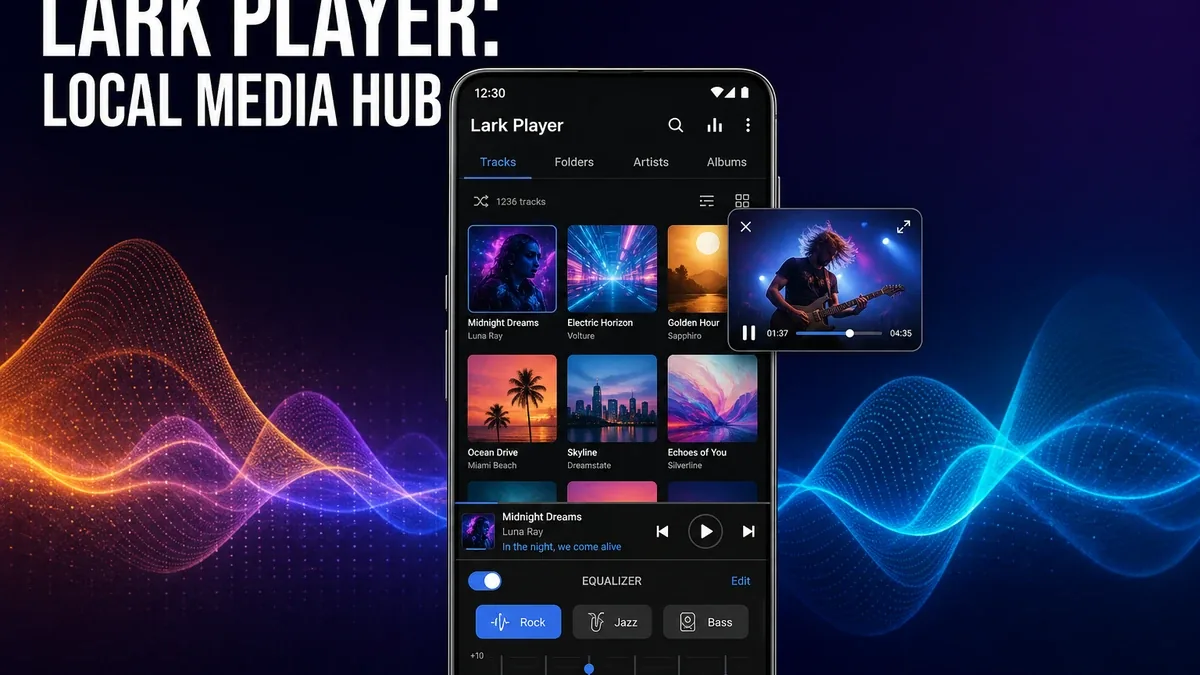
Streaming apps organize music you still need to fetch. Local media hubs organize files you already own. If your phone is full of downloaded songs and offline videos, the better app is often the one that plays what is already there — not the one with the biggest catalog pitch.
Download Lark Player MOD APK - Pro Unlocked
Lark Player · Local Music Player · Offline Video · Media Hub · Android 2026
The Real Question Is Local Library Hub vs Specialist Playback
Many Android users bounce between a music streamer, a video player, and the stock media app because each tool only covers part of the library. That split becomes friction when your real collection already lives on device: MP3 folders, downloaded albums, offline movies, lecture recordings, and local clips.
The core thesis of this article is simple: Lark Player is better when you need one Android hub for local music and video already stored on the phone, while specialist players remain better when one format or one playback job needs deeper control. The best media app is not always the strongest streamer. It is the one that matches whether your bottleneck is library centralization or specialist performance.
Why Local Media Hubs Solve a Different Problem Than Offline Streaming
Offline-first streaming apps matter when the workflow is download from a service, then listen later. That is a preparation problem. Lark Player is solving a different layer: files are already on the device, and you want browsing, equalizer presets, lyrics matching, floating playback, and video support without opening three apps.
That distinction matters. If your frustration is catalog access without data, an offline streaming workflow may still be the better answer. If your frustration is "my downloads are scattered across folders and players," a local media hub is the more direct fix.
Lark Player is less convincing as a discovery ecosystem replacement. It is more convincing as a daily player for an owned library that mixes audio and video.
What Lark Player Actually Does Better
Lark Player MOD APK makes more sense when your phone already holds the library. Multi-format audio, local video playback, folder-style browsing, floating player multitasking, and sound presets sit in one place instead of forcing a music-only or video-only habit.
What you gain: one hub for owned media, fewer app switches between songs and local videos, and a more complete offline playback surface without depending on a streaming account.
What you lose: specialist depth. A dedicated video player may handle tough files and subtitles better. A sound-first music player may go deeper on EQ rituals. A streaming app still wins when discovery is the job.
Lark Player is strongest when convenience and library coverage matter more than extreme playback specialization. It is weaker when one hard format, one subtitle workflow, or one discovery ecosystem is the real bottleneck.
Best For, Not Ideal For
Lark Player is best for: users with a mixed local library of music and video who want one everyday Android player instead of separate apps for each media type.
Specialist players are better when: you mainly need advanced video decoding and subtitle control — start with MX Player Pro — or when your listening life is still discovery-first inside a streaming ecosystem.
Not ideal for Lark Player: users who barely keep local files, or listeners who want a sound-engineering ritual more than a simple library hub.
Biggest cost: breadth over depth. A hub can cover more media types while feeling less specialized than a player built for one hard job.
Before You Choose Lark Player
Before choosing Lark Player, ask whether your friction is scattered local files or missing streaming access. If songs and videos are already on the phone and you just need them in one calmer player, Lark fits. If you still need downloads from a service because the library is not local yet, start with an offline streaming path such as Trebel for offline preparation.
For install friction, keep the APK parsing error fix and the MOD APK safety guide nearby.
Our Honest Recommendation
Choose Lark Player when your Android media life is already local and you want one hub for music plus video. Choose a specialist player when one playback job needs deeper control, and stay with streaming when discovery is still the main need.
In short: Lark Player is better for owned-library convenience. Specialists are better for hard playback jobs. Streamers are better for finding what you do not own yet.
How to Download Lark Player MOD APK
Since the modded version is not available on the Google Play Store, you need to install it manually. Follow these steps:
- Enable Unknown Sources: Open Android settings, go to "Security" or "Apps," and enable "Install from Unknown Sources."
- Download the APK: Use the app page link to get the latest Lark Player MOD APK version.
- Remove Conflicting Versions: Uninstall the official Lark Player build first if installation fails due to signature conflict.
- Install the APK: Tap the downloaded file and complete installation.
- Test the Real Library: Open a local album and one offline video, then ask whether one hub felt clearer than switching between separate players.
A local media hub only earns its place if your files are already on the device. If the library still lives in the cloud, centralizing playback will not solve the real gap.
FAQ
Is Lark Player better than Spotify?
Not for discovery. Lark Player is better when you already have local files and want offline playback without a streaming workflow. Spotify-class apps remain stronger for finding and following music online.
Who should use Lark Player?
Users who keep mixed local music and video on Android and want one everyday player instead of separate apps for each media type.
When is Lark Player the wrong choice?
When you need specialist video tools, deeper sound-engineering control, or a streaming discovery ecosystem more than a local library hub.
What is the biggest trade-off with Lark Player?
You gain broader local media coverage in one place, but you may lose the depth that specialist music or video players provide for harder playback jobs.
If your Android media already lives in folders, Lark Player is one of the clearer ways to stop splitting music and video across separate apps.