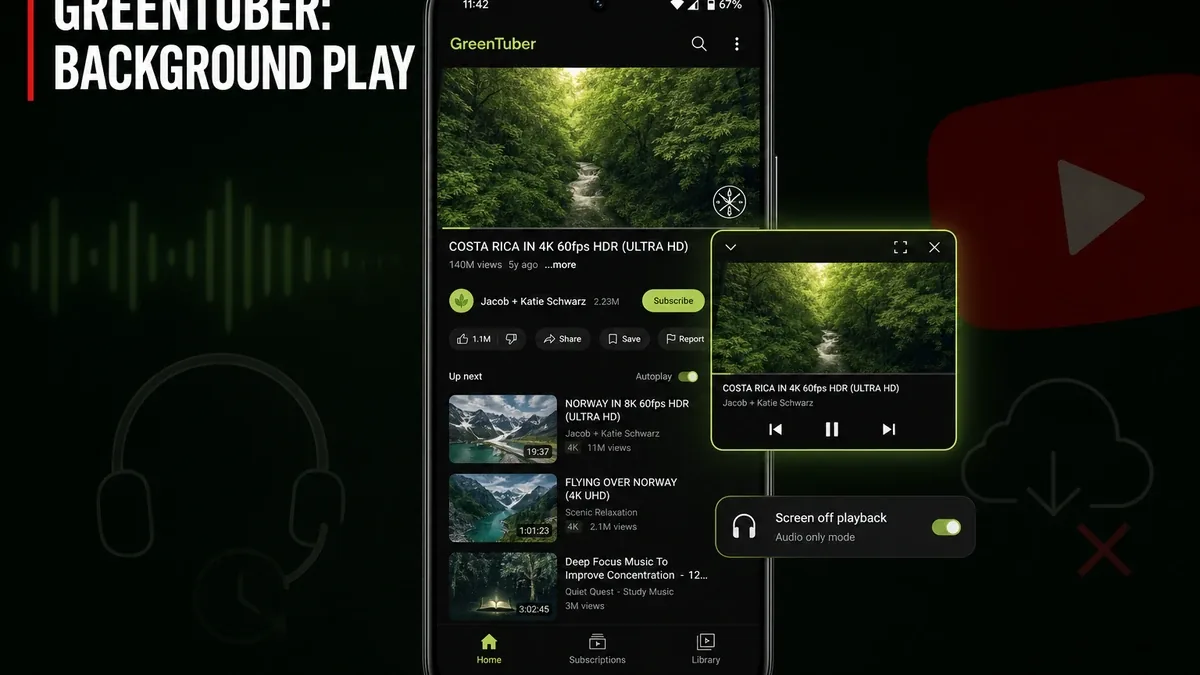
YouTube Premium is not the only search. Many people only want two Premium-class habits on Android: playback when the screen is off, and fewer mid-roll ads — without pretending they need offline folders or a full patched official client ecosystem.
Download GreenTuber MOD APK - Premium Unlocked, No Ads
GreenTuber · YouTube Client · Background Play · Ad-Free · Android 2026
The Real Split Is Playback Continuity vs Offline Storage
Downloaders answer a storage job: keep files for later offline. Heavy official patches and MicroG setups chase login continuity with the full Premium surface. GreenTuber targets a narrower, very popular need — stream YouTube-class content with background play, floating windows, and ad interruption reduced — when the phone still stays online and account-subscription cost is the blocker.
The core thesis of this article is simple: GreenTuber is better when the unfinished job is screen-off and multi-task YouTube listening/watching with less ad break friction, while SnapTube-class tools remain better when downloads are the real job, and official Premium remains better when login rights and ecosystem support must stay fully legitimate. The core trade is playback continuity against weaker offline permanence and platform risk of third-party clients.
When Background Play Is the Only Premium Habit You Actually Use
Concrete GreenTuber job: lock the screen and keep a long video essay audio running while commuting; open chat apps while a floating player keeps a tutorial visible at reduced size; skip mid-roll interruptions that kill focus every eight minutes.
That is not the same as offline sports: packing a plane flight with downloaded MP4s belongs to SnapTube/VidMate-class downloaders. It is also not “rebuild every Premium entitlement inside a patched official app.” GreenTuber lives in continuous online playback habits.
What GreenTuber Actually Does Better
GreenTuber MOD APK is the right pick when ad-reduced streaming plus background and floating playback are the premium behaviors you actually use every day on Android.
What you gain: screen-off continuity, multitask floating windows, and fewer ad breaks during longer watches when the client continues to work.
What you lose: hard offline libraries (this build’s notes focus on streaming and playback, not replacing a dedicated downloader) and official Google support for a third-party client path.
GreenTuber is strongest for always-online daily play. It is weaker when the job is filling SD cards before flights or using server-locked account features that only official apps guarantee.
Best For, Not Ideal For
GreenTuber is best for: users who mainly want background play and less ad interruption while remaining on mobile data or Wi-Fi.
Downloaders are better when: offline files are the real product — trips, unstable coverage, large archives.
Official YouTube Premium is better when: legal/supportable Premium rights, multi-device ecosystem, and account policy risk matter more than client workarounds.
Not ideal for GreenTuber: users who refuse any third-party YouTube client, or who need guaranteed offline packs this build does not emphasize.
Biggest cost: client fragility. The unit of cost is broken playback or updates when upstream changes — not catalog incomplete music playlists alone.
Before You Choose GreenTuber
Before choosing GreenTuber, name the Premium feature you open daily. If it is screen-off audio or floating play while chatting, GreenTuber’s lane fits. If it is “fill offline folder every Sunday,” start with a downloader or paid Premium.
For install friction, keep the APK parsing error fix and the MOD APK safety guide nearby.
Our Honest Recommendation
Choose GreenTuber when background and lower-ad continuous play are the real habits. Choose downloaders for offline files. Choose official Premium when policy risk and full ecosystem rights matter more.
In short: GreenTuber is better for online playback continuity. Storage apps are better for offline custody.
How to Download GreenTuber MOD APK
Since the modded version is not available on the Google Play Store, you need to install it manually. Follow these steps:
- Enable Unknown Sources: Open Android settings, go to "Security" or "Apps," and enable "Install from Unknown Sources."
- Download the APK: Use the app page link to get the latest GreenTuber MOD APK version.
- Remove Conflicting Versions: Uninstall other YouTube clients with conflicting builds if installation fails.
- Install the APK: Tap the downloaded file and complete installation.
- Judge It by Two Habits: Lock the screen mid-video and open chat with floating play once. If neither worked better than stock YouTube, Premium’s other features or a downloader were never your real need either.
GreenTuber earns space if background continuity is real on your network. Third-party clients can break when the upstream platform changes — treat that as part of the trade.
FAQ
Is GreenTuber a free YouTube Premium?
No. It aims at popular Premium-like playback habits such as background play and fewer ads. It is not a full official Premium product.
Who should use GreenTuber?
Users who mainly need screen-off or floating continuous YouTube-class playback with less ad interruption while online.
When is GreenTuber the wrong choice?
When offline downloads are required, or when only official account rights and supportable Premium are acceptable.
What is the biggest trade-off with GreenTuber?
You gain popular continuous playback habits, but you accept third-party client risk and weaker offline permanence than dedicated downloaders.
If what you actually want from Premium is screen-off and cleaner continuous play — not a hard drive of offline files — GreenTuber sits in one of the highest-demand Android lanes.